


2025 Easy Success Databricks Associate-Developer-Apache-Spark-3.5 Exam in First Try
Best Associate-Developer-Apache-Spark-3.5 Exam Dumps for the Preparation of Latest Exam Questions
NEW QUESTION # 28
A Spark developer wants to improve the performance of an existing PySpark UDF that runs a hash function that is not available in the standard Spark functions library. The existing UDF code is: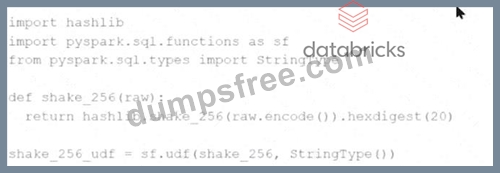
import hashlib
import pyspark.sql.functions as sf
from pyspark.sql.types import StringType
def shake_256(raw):
return hashlib.shake_256(raw.encode()).hexdigest(20)
shake_256_udf = sf.udf(shake_256, StringType())
The developer wants to replace this existing UDF with a Pandas UDF to improve performance. The developer changes the definition ofshake_256_udfto this:CopyEdit shake_256_udf = sf.pandas_udf(shake_256, StringType()) However, the developer receives the error:
What should the signature of theshake_256()function be changed to in order to fix this error?
- A. def shake_256(raw: str) -> str:
- B. def shake_256(df: Iterator[pd.Series]) -> Iterator[pd.Series]:
- C. def shake_256(df: pd.Series) -> pd.Series:
- D. def shake_256(df: pd.Series) -> str:
Answer: C
Explanation:
Comprehensive and Detailed Explanation From Exact Extract:
When converting a standard PySpark UDF to a Pandas UDF for performance optimization, the function must operate on a Pandas Series as input and return a Pandas Series as output.
In this case, the original function signature:
def shake_256(raw: str) -> str
is scalar - not compatible with Pandas UDFs.
According to the official Spark documentation:
"Pandas UDFs operate onpandas.Seriesand returnpandas.Series. The function definition should be:
def my_udf(s: pd.Series) -> pd.Series:
and it must be registered usingpandas_udf(...)."
Therefore, to fix the error:
The function should be updated to:
def shake_256(df: pd.Series) -> pd.Series:
return df.apply(lambda x: hashlib.shake_256(x.encode()).hexdigest(20))
This will allow Spark to efficiently execute the Pandas UDF in vectorized form, improving performance compared to standard UDFs.
Reference: Apache Spark 3.5 Documentation # User-Defined Functions # Pandas UDFs
NEW QUESTION # 29
A data engineer wants to write a Spark job that creates a new managed table. If the table already exists, the job should fail and not modify anything.
Which save mode and method should be used?
- A. saveAsTable with mode Overwrite
- B. saveAsTable with mode ErrorIfExists
- C. save with mode Ignore
- D. save with mode ErrorIfExists
Answer: B
Explanation:
Comprehensive and Detailed Explanation:
The methodsaveAsTable()creates a new table and optionally fails if the table exists.
From Spark documentation:
"The mode 'ErrorIfExists' (default) will throw an error if the table already exists." Thus:
Option A is correct.
Option B (Overwrite) would overwrite existing data - not acceptable here.
Option C and D usesave(), which doesn't create a managed table with metadata in the metastore.
Final Answer: A
NEW QUESTION # 30
A Spark application developer wants to identify which operations cause shuffling, leading to a new stage in the Spark execution plan.
Which operation results in a shuffle and a new stage?
- A. DataFrame.groupBy().agg()
- B. DataFrame.select()
- C. DataFrame.withColumn()
- D. DataFrame.filter()
Answer: A
Explanation:
Comprehensive and Detailed Explanation From Exact Extract:
Operations that trigger data movement across partitions (like groupBy, join, repartition) result in a shuffle and a new stage.
From Spark documentation:
"groupBy and aggregation cause data to be shuffled across partitions to combine rows with the same key." Option A (groupBy + agg) # causes shuffle.
Options B, C, and D (filter, withColumn, select) # transformations that do not require shuffling; they are narrow dependencies.
Final Answer: A
NEW QUESTION # 31
What is the difference betweendf.cache()anddf.persist()in Spark DataFrame?
- A. Both functions perform the same operation. Thepersist()function provides improved performance asits default storage level isDISK_ONLY.
- B. Bothcache()andpersist()can be used to set the default storage level (MEMORY_AND_DISK_SER)
- C. cache()- Persists the DataFrame with the default storage level (MEMORY_AND_DISK) andpersist()- Can be used to set different storage levels to persist the contents of the DataFrame
- D. persist()- Persists the DataFrame with the default storage level (MEMORY_AND_DISK_SER) andcache()- Can be used to set different storage levels to persist the contents of the DataFrame.
Answer: C
Explanation:
Comprehensive and Detailed Explanation From Exact Extract:
df.cache()is shorthand fordf.persist(StorageLevel.MEMORY_AND_DISK)
df.persist()allows specifying any storage level such asMEMORY_ONLY,DISK_ONLY, MEMORY_AND_DISK_SER, etc.
By default,persist()usesMEMORY_AND_DISK, unless specified otherwise.
Reference:Spark Programming Guide - Caching and Persistence
NEW QUESTION # 32
A Spark application suffers from too many small tasks due to excessive partitioning. How can this be fixed without a full shuffle?
Options:
- A. Use the distinct() transformation to combine similar partitions
- B. Use the sortBy() transformation to reorganize the data
- C. Use the repartition() transformation with a lower number of partitions
- D. Use the coalesce() transformation with a lower number of partitions
Answer: D
Explanation:
coalesce(n) reduces the number of partitions without triggering a full shuffle, unlike repartition().
This is ideal when reducing partition count, especially during write operations.
Reference:Spark API - coalesce
NEW QUESTION # 33
A data scientist wants each record in the DataFrame to contain:
The first attempt at the code does read the text files but each record contains a single line. This code is shown below: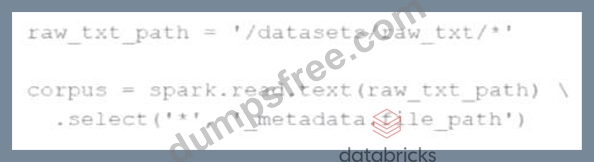
The entire contents of a file
The full file path
The issue: reading line-by-line rather than full text per file.
Code:
corpus = spark.read.text("/datasets/raw_txt/*") \
.select('*','_metadata.file_path')
Which change will ensure one record per file?
Options:
- A. Add the option wholetext=True to the text() function
- B. Add the option wholetext=False to the text() function
- C. Add the option lineSep='\n' to the text() function
- D. Add the option lineSep=", " to the text() function
Answer: A
Explanation:
To read each file as a single record, use:
spark.read.text(path, wholetext=True)
This ensures that Spark reads the entire file contents into one row.
Reference:Spark read.text() with wholetext
NEW QUESTION # 34
A data engineer is building an Apache Spark™ Structured Streaming application to process a stream of JSON events in real time. The engineer wants the application to be fault-tolerant and resume processing from the last successfully processed record in case of a failure. To achieve this, the data engineer decides to implement checkpoints.
Which code snippet should the data engineer use?
- A. query = streaming_df.writeStream \
.format("console") \
.option("checkpoint", "/path/to/checkpoint") \
.outputMode("append") \
.start() - B. query = streaming_df.writeStream \
.format("console") \
.outputMode("append") \
.option("checkpointLocation", "/path/to/checkpoint") \
.start() - C. query = streaming_df.writeStream \
.format("console") \
.outputMode("append") \
.start() - D. query = streaming_df.writeStream \
.format("console") \
.outputMode("complete") \
.start()
Answer: B
Explanation:
Comprehensive and Detailed Explanation From Exact Extract:
To enable fault tolerance and ensure that Spark can resume from the last committed offset after failure, you must configure a checkpoint location using the correct option key:"checkpointLocation".
From the official Spark Structured Streaming guide:
"To make a streaming query fault-tolerant and recoverable, a checkpoint directory must be specified using.
option("checkpointLocation", "/path/to/dir")."
Explanation of options:
Option A uses an invalid option name:"checkpoint"(should be"checkpointLocation") Option B is correct: it setscheckpointLocationproperly Option C lacks checkpointing and won't resume after failure Option D also lacks checkpointing configuration Reference: Apache Spark 3.5 Documentation # Structured Streaming # Fault Tolerance Semantics
NEW QUESTION # 35
A Spark developer is building an app to monitor task performance. They need to track the maximum task processing time per worker node and consolidate it on the driver for analysis.
Which technique should be used?
- A. Use an accumulator to record the maximum time on the driver
- B. Use an RDD action like reduce() to compute the maximum time
- C. Configure the Spark UI to automatically collect maximum times
- D. Broadcast a variable to share the maximum time among workers
Answer: B
Explanation:
Comprehensive and Detailed Explanation From Exact Extract:
The correct way to aggregate information (e.g., max value) from distributed workers back to the driver is using RDD actions such asreduce()oraggregate().
From the documentation:
"To perform global aggregations on distributed data, actions likereduce()are commonly used to collect summaries such as min/max/avg." Accumulators (Option B) do not support max operations directly and are not intended for such analytics.
Broadcast (Option C) is used to send data to workers, not collect from them.
Spark UI (Option D) is a monitoring tool - not an analytics collection interface.
Final Answer: A
NEW QUESTION # 36
What is a feature of Spark Connect?
- A. It has built-in authentication
- B. It supports DataStreamReader, DataStreamWriter, StreamingQuery, and Streaming APIs
- C. It supports only PySpark applications
- D. Supports DataFrame, Functions, Column, SparkContext PySpark APIs
Answer: B
Explanation:
Comprehensive and Detailed Explanation From Exact Extract:
Spark Connect is a client-server architecture introduced in Apache Spark 3.4, designed to decouple the client from the Spark driver, enabling remote connectivity to Spark clusters.
According to the Spark 3.5.5 documentation:
"Majority of the Streaming API is supported, including DataStreamReader, DataStreamWriter, StreamingQuery and StreamingQueryListener." This indicates that Spark Connect supports key components of Structured Streaming, allowing for robust streaming data processing capabilities.
Regarding other options:
B).While Spark Connect supports DataFrame, Functions, and Column APIs, it does not support SparkContext and RDD APIs.
C).Spark Connect supports multiple languages, including PySpark and Scala, not just PySpark.
D).Spark Connect does not have built-in authentication but is designed to work seamlessly with existing authentication infrastructures.
NEW QUESTION # 37
A data engineer writes the following code to join two DataFramesdf1anddf2:
df1 = spark.read.csv("sales_data.csv") # ~10 GB
df2 = spark.read.csv("product_data.csv") # ~8 MB
result = df1.join(df2, df1.product_id == df2.product_id)
Which join strategy will Spark use?
- A. Shuffle join because no broadcast hints were provided
- B. Broadcast join, as df2 is smaller than the default broadcast threshold
- C. Shuffle join, as the size difference between df1 and df2 is too large for a broadcast join to work efficiently
- D. Shuffle join, because AQE is not enabled, and Spark uses a static query plan
Answer: B
Explanation:
Comprehensive and Detailed Explanation From Exact Extract:
The default broadcast join threshold in Spark is:
spark.sql.autoBroadcastJoinThreshold = 10MB
Sincedf2is only 8 MB (less than 10 MB), Spark will automatically apply a broadcast join without requiring explicit hints.
From the Spark documentation:
"If one side of the join is smaller than the broadcast threshold, Spark will automatically broadcast it to all executors." A is incorrect because Spark does support auto broadcast even with static plans.
B is correct: Spark will automatically broadcast df2.
C and D are incorrect because Spark's default logic handles this optimization.
Final Answer: B
NEW QUESTION # 38
A developer is trying to join two tables,sales.purchases_fctandsales.customer_dim, using the following code:
fact_df = purch_df.join(cust_df, F.col('customer_id') == F.col('custid')) The developer has discovered that customers in thepurchases_fcttable that do not exist in thecustomer_dimtable are being dropped from the joined table.
Which change should be made to the code to stop these customer records from being dropped?
- A. fact_df = cust_df.join(purch_df, F.col('customer_id') == F.col('custid'))
- B. fact_df = purch_df.join(cust_df, F.col('cust_id') == F.col('customer_id'))
- C. fact_df = purch_df.join(cust_df, F.col('customer_id') == F.col('custid'), 'right_outer')
- D. fact_df = purch_df.join(cust_df, F.col('customer_id') == F.col('custid'), 'left')
Answer: D
Explanation:
Comprehensive and Detailed Explanation From Exact Extract:
In Spark, the default join type is an inner join, which returns only the rows with matching keys in both DataFrames. To retain all records from the left DataFrame (purch_df) and include matching records from the right DataFrame (cust_df), a left outer join should be used.
By specifying the join type as'left', the modified code ensures that all records frompurch_dfare preserved, and matching records fromcust_dfare included. Records inpurch_dfwithout a corresponding match incust_dfwill havenullvalues for the columns fromcust_df.
This approach is consistent with standard SQL join operations and is supported in PySpark's DataFrame API.
NEW QUESTION # 39
A Data Analyst is working on the DataFramesensor_df, which contains two columns:
Which code fragment returns a DataFrame that splits therecordcolumn into separate columns and has one array item per row?
A)
B)
C)
D)
- A. exploded_df = sensor_df.withColumn("record_exploded", explode("record")) exploded_df = exploded_df.select("record_datetime", "sensor_id", "status", "health")
- B. exploded_df = exploded_df.select(
"record_datetime",
"record_exploded.sensor_id",
"record_exploded.status",
"record_exploded.health"
)
exploded_df = sensor_df.withColumn("record_exploded", explode("record")) - C. exploded_df = exploded_df.select("record_datetime", "record_exploded")
- D. exploded_df = exploded_df.select(
"record_datetime",
"record_exploded.sensor_id",
"record_exploded.status",
"record_exploded.health"
)
exploded_df = sensor_df.withColumn("record_exploded", explode("record"))
Answer: B
Explanation:
Comprehensive and Detailed Explanation From Exact Extract:
To flatten an array of structs into individual rows and access fields within each struct, you must:
Useexplode()to expand the array so each struct becomes its own row.
Access the struct fields via dot notation (e.g.,record_exploded.sensor_id).
Option C does exactly that:
First, explode therecordarray column into a new columnrecord_exploded.
Then, access fields of the struct using the dot syntax inselect.
This is standard practice in PySpark for nested data transformation.
Final Answer: C
NEW QUESTION # 40
A data engineer is streaming data from Kafka and requires:
Minimal latency
Exactly-once processing guarantees
Which trigger mode should be used?
- A. .trigger(continuous='1 second')
- B. .trigger(processingTime='1 second')
- C. .trigger(availableNow=True)
- D. .trigger(continuous=True)
Answer: B
Explanation:
Comprehensive and Detailed Explanation:
Exactly-once guarantees in Spark Structured Streaming require micro-batch mode (default), not continuous mode.
Continuous mode (.trigger(continuous=...)) only supports at-least-once semantics and lacks full fault- tolerance.
trigger(availableNow=True)is a batch-style trigger, not suited for low-latency streaming.
So:
Option A uses micro-batching with a tight trigger interval # minimal latency + exactly-once guarantee.
Final Answer: A
NEW QUESTION # 41
In the code block below,aggDFcontains aggregations on a streaming DataFrame: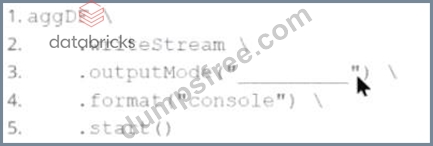
Which output mode at line 3 ensures that the entire result table is written to the console during each trigger execution?
- A. aggregate
- B. append
- C. replace
- D. complete
Answer: D
Explanation:
Comprehensive and Detailed Explanation From Exact Extract:
The correct output mode for streaming aggregations that need to output the full updated results at each trigger is"complete".
From the official documentation:
"complete: The entire updated result table will be output to the sink every time there is a trigger." This is ideal for aggregations, such as counts or averages grouped by a key, where the result table changes incrementally over time.
append: only outputs newly added rows
replace and aggregate: invalid values for output mode
Reference: Spark Structured Streaming Programming Guide # Output Modes
NEW QUESTION # 42
A Spark engineer is troubleshooting a Spark application that has been encountering out-of-memory errors during execution. By reviewing the Spark driver logs, the engineer notices multiple "GC overhead limit exceeded" messages.
Which action should the engineer take to resolve this issue?
- A. Optimize the data processing logic by repartitioning the DataFrame.
- B. Increase the memory allocated to the Spark Driver.
- C. Modify the Spark configuration to disable garbage collection
- D. Cache large DataFrames to persist them in memory.
Answer: B
Explanation:
Comprehensive and Detailed Explanation From Exact Extract:
The message"GC overhead limit exceeded"typically indicates that the JVM is spending too much time in garbage collection with little memory recovery. This suggests that the driver or executor is under-provisioned in memory.
The most effective remedy is to increase the driver memory using:
--driver-memory 4g
This is confirmed in Spark's official troubleshooting documentation:
"If you see a lot ofGC overhead limit exceedederrors in the driver logs, it's a sign that the driver is running out of memory."
-Spark Tuning Guide
Why others are incorrect:
Amay help but does not directly address the driver memory shortage.
Bis not a valid action; GC cannot be disabled.
Dincreases memory usage, worsening the problem.
NEW QUESTION # 43
A Spark application is experiencing performance issues in client mode because the driver is resource- constrained.
How should this issue be resolved?
- A. Switch the deployment mode to local mode
- B. Increase the driver memory on the client machine
- C. Add more executor instances to the cluster
- D. Switch the deployment mode to cluster mode
Answer: D
Explanation:
Comprehensive and Detailed Explanation From Exact Extract:
In Spark's client mode, the driver runs on the local machine that submitted the job. If that machine is resource- constrained (e.g., low memory), performance degrades.
From the Spark documentation:
"In cluster mode, the driver runs inside the cluster, benefiting from cluster resources and scalability." Option A is incorrect - executors do not help the driver directly.
Option B might help short-term but does not scale.
Option C is correct - switching to cluster mode moves the driver to the cluster.
Option D (local mode) is for development/testing, not production.
Final Answer: C
NEW QUESTION # 44
A data engineer is reviewing a Spark application that applies several transformations to a DataFrame but notices that the job does not start executing immediately.
Which two characteristics of Apache Spark's execution model explain this behavior?
Choose 2 answers:
- A. The Spark engine requires manual intervention to start executing transformations.
- B. Only actions trigger the execution of the transformation pipeline.
- C. Transformations are executed immediately to build the lineage graph.
- D. Transformations are evaluated lazily.
- E. The Spark engine optimizes the execution plan during the transformations, causing delays.
Answer: B,D
Explanation:
Comprehensive and Detailed Explanation From Exact Extract:
Apache Spark employs a lazy evaluation model for transformations. This means that when transformations (e.
g.,map(),filter()) are applied to a DataFrame, Spark does not execute them immediately. Instead, it builds a logical plan (lineage) of transformations to be applied.
Execution is deferred until an action (e.g.,collect(),count(),save()) is called. At that point, Spark's Catalyst optimizer analyzes the logical plan, optimizes it, and then executes the physical plan to produce the result.
This lazy evaluation strategy allows Spark to optimize the execution plan, minimize data shuffling, and improve overall performance by reducing unnecessary computations.
NEW QUESTION # 45
A data engineer wants to create an external table from a JSON file located at/data/input.jsonwith the following requirements:
Create an external table namedusers
Automatically infer schema
Merge records with differing schemas
Which code snippet should the engineer use?
Options:
- A. CREATE EXTERNAL TABLE users USING json OPTIONS (path '/data/input.json', schemaMerge
'true') - B. CREATE EXTERNAL TABLE users USING json OPTIONS (path '/data/input.json')
- C. CREATE EXTERNAL TABLE users USING json OPTIONS (path '/data/input.json', mergeSchema
'true') - D. CREATE TABLE users USING json OPTIONS (path '/data/input.json')
Answer: C
Explanation:
To create an external table and enable schema merging, the correct syntax is:
CREATEEXTERNALTABLEusers
USINGjson
OPTIONS (
path'/data/input.json',
mergeSchema'true'
)
mergeSchemais the correct option key (notschemaMerge)
EXTERNALallows Spark to query files without managing their lifecycle
Reference:Spark SQL DDL - JSON and Schema Merging
NEW QUESTION # 46
A data engineer needs to write a Streaming DataFrame as Parquet files.
Given the code: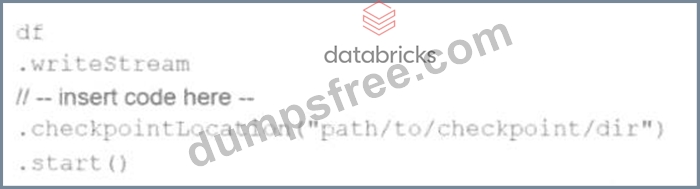
Which code fragment should be inserted to meet the requirement?
A)
B)
C)
D)
Which code fragment should be inserted to meet the requirement?
- A. .option("format", "parquet")
.option("location", "path/to/destination/dir") - B. .format("parquet")
.option("path", "path/to/destination/dir") - C. CopyEdit
.option("format", "parquet")
.option("destination", "path/to/destination/dir") - D. .format("parquet")
.option("location", "path/to/destination/dir")
Answer: B
Explanation:
Comprehensive and Detailed Explanation From Exact Extract:
To write a structured streaming DataFrame to Parquet files, the correct way to specify the format and output directory is:
writeStream
format("parquet")
option("path", "path/to/destination/dir")
According to Spark documentation:
"When writing to file-based sinks (like Parquet), you must specify the path using the .option("path", ...) method. Unlike batch writes, .save() is not supported." Option A incorrectly uses.option("location", ...)(invalid for Parquet sink).
Option B incorrectly sets the format via.option("format", ...), which is not the correct method.
Option C repeats the same issue.
Option D is correct:.format("parquet")+.option("path", ...)is the required syntax.
Final Answer: D
NEW QUESTION # 47
The following code fragment results in an error:
@F.udf(T.IntegerType())
def simple_udf(t: str) -> str:
return answer * 3.14159
Which code fragment should be used instead?
- A. @F.udf(T.DoubleType())
def simple_udf(t: float) -> float:
return t * 3.14159 - B. @F.udf(T.IntegerType())
def simple_udf(t: float) -> float:
return t * 3.14159 - C. @F.udf(T.DoubleType())
def simple_udf(t: int) -> int:
return t * 3.14159 - D. @F.udf(T.IntegerType())
def simple_udf(t: int) -> int:
return t * 3.14159
Answer: A
Explanation:
Comprehensive and Detailed Explanation:
The original code has several issues:
It references a variable answer that is undefined.
The function is annotated to return a str, but the logic attempts numeric multiplication.
The UDF return type is declared as T.IntegerType() but the function performs a floating-point operation, which is incompatible.
Option B correctly:
Uses DoubleType to reflect the fact that the multiplication involves a float (3.14159).
Declares the input as float, which aligns with the multiplication.
Returns a float, which matches both the logic and the schema type annotation.
This structure aligns with how PySpark expects User Defined Functions (UDFs) to be declared:
"To define a UDF you must specify a Python function and provide the return type using the relevant Spark SQL type (e.g., DoubleType for float results)." Example from official documentation:
from pyspark.sql.functions import udf
from pyspark.sql.types import DoubleType
@udf(returnType=DoubleType())
def multiply_by_pi(x: float) -> float:
return x * 3.14159
This makes Option B the syntactically and semantically correct choice.
NEW QUESTION # 48
Which UDF implementation calculates the length of strings in a Spark DataFrame?
- A. df.withColumn("length", spark.udf("len", StringType()))
- B. df.select(length(col("stringColumn")).alias("length"))
- C. spark.udf.register("stringLength", lambda s: len(s))
- D. df.withColumn("length", udf(lambda s: len(s), StringType()))
Answer: B
Explanation:
Comprehensive and Detailed Explanation From Exact Extract:
Option B uses Spark's built-in SQL function length(), which is efficient and avoids the overhead of a Python UDF:
from pyspark.sql.functions import length, col
df.select(length(col("stringColumn")).alias("length"))
Explanation of other options:
Option A is incorrect syntax;spark.udfis not called this way.
Option C registers a UDF but doesn't apply it in the DataFrame transformation.
Option D is syntactically valid but uses a Python UDF which is less efficient than built-in functions.
Final Answer: B
NEW QUESTION # 49
......
Associate-Developer-Apache-Spark-3.5 Study Material, Preparation Guide and PDF Download: https://dumpstorrent.dumpsfree.com/Associate-Developer-Apache-Spark-3.5-valid-exam.html